The next decision, on the screen you have.
When you are away from the desk, you still need the relevant facts. Add Vycko's web app to your phone's home screen, review an urgent alert or approval and open the customer and device context before choosing the next step.
Keep the important work close
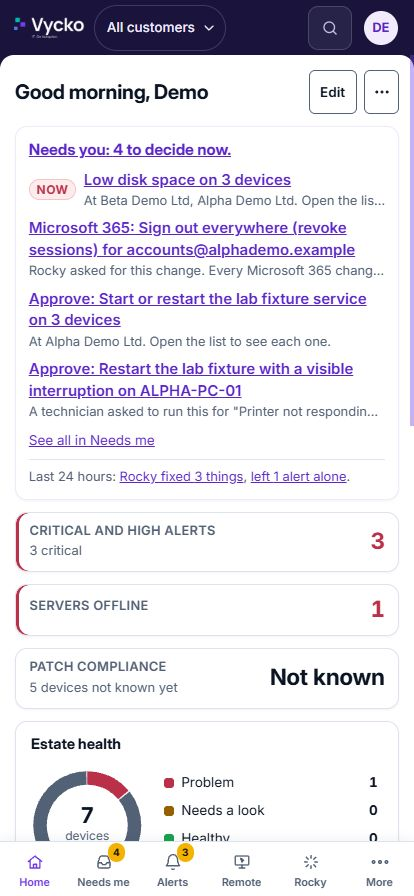
The touch dashboard brings the support overview to a smaller screen. Review Rocky's work, open the morning summary and see the decisions waiting for you.
- Install the supported web app on the phone's home screen.
- Receive configured urgent notifications and approval prompts.
- Keep the same sign-in, role and company or customer scope.
Investigate before deciding whether to return to the desk
A server alert reaches your phone while you are away from the office. Open the affected device, review when it was last seen and what changed, then choose the authorised next step. Supported remote sessions provide touch controls and a trackpad mode.
- Use the evidence and session type that fit the task.
- Customer consent and access settings still apply.
- Some detailed support jobs are easier on a larger screen.
Confirm the phone workflow before relying on it
Notification support depends on the phone, browser and permissions. We will demonstrate the supported setup and confirm which enabled actions fit your team's workflow.
- Vycko runs as a web app that you can add to your phone’s home screen.
- Fresh-code and approval requirements still apply to the relevant changes.
- Work-from-home access for staff to their own office computer is a separate feature, off until enabled for chosen people.
See Vycko working.
Bring the jobs you want to make easier. We’ll show you the relevant workflows.
Newark Solutions Ltd trading as Vycko